
claude-orchestrator: Run as Many Claude Desktop Instances as You Want on macOS
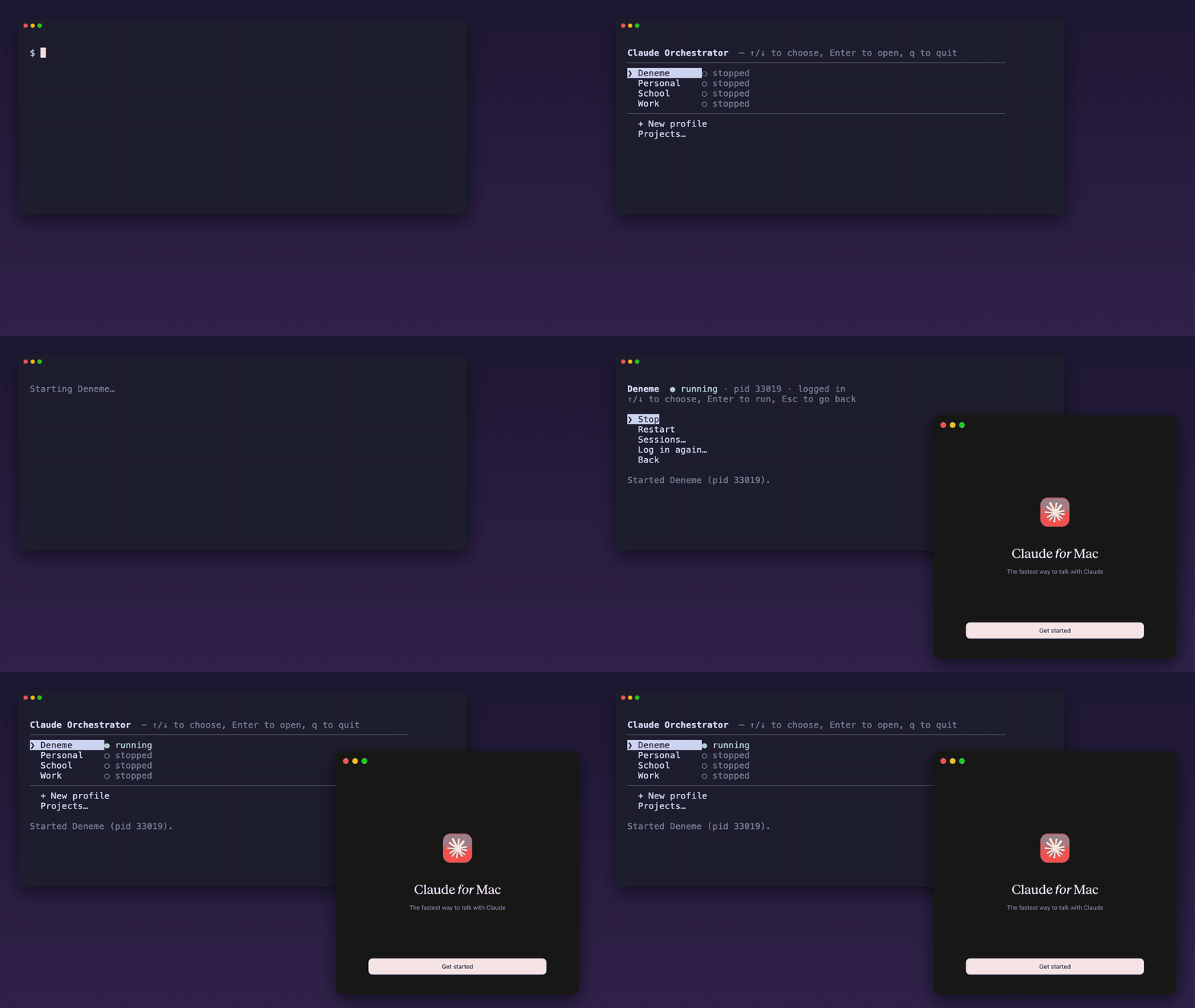
We use Claude Desktop all day, and we hit the same wall many people do: it lives in a single Electron profile. One account, one set of Code tab sessions, one working directory at a time. Launch it a second time and it either brings back the window you already have or refuses to start. Keeping a work account and a personal account signed in side by side simply isn't possible out of the box.
So we built claude-orchestrator, a small, open-source command-line tool for macOS that runs Claude Desktop as many independent instances as you want. Each one has its own profile, account, sessions, Claude Code configuration and working directory.
It never touches Claude.app
The usual workaround is to copy the app bundle and patch it. That copy falls behind on every
update and has to be rebuilt again and again. claude-orchestrator does nothing of the sort: it
never copies, patches or re-signs /Applications/Claude.app. It launches the original, signed
app with a different data directory, so the code signature, notarization, permissions and the
built-in updater all keep working.
It relies on mechanisms Claude and macOS already ship:
| What | How |
|---|---|
| Separate Electron profile (cookies, sessions, settings) | --user-data-dir=<per-instance path> |
Separate Claude Code config (~/.claude, sessions) |
CLAUDE_CONFIG_DIR=<per-instance path> |
| Separate application instance | open -n |
Quick start: one instance per account
claude-orchestrator new work
claude-orchestrator new school
claude-orchestrator new client --workdir ~/workspace/client

claude-orchestrator signin work --exclusive
claude-orchestrator signin school --exclusive

claude-orchestrator start work && claude-orchestrator start school
claude-orchestrator agent --install     # menu bar icons to start, stop and switch
signin --exclusive closes the other instances while you sign in, because the browser hands the
login back through a single claude:// link that only one running Claude can receive. They are
reopened when you press Enter.
Prefer not to remember commands? Run claude-orchestrator with no arguments and do everything
from an interactive menu: start and stop profiles, log in, browse sessions, manage projects.
More than a launcher
Once you have several instances, new questions come up quickly. claude-orchestrator answers them too:
- Projects in every instance. The Code tab's environments are stored per profile and per
account.
claude-orchestrator projectkeeps one list and writes it into all instances. You can also keep the list in aprojects.jsonfile, preview the changes with--dry-runand apply it everywhere. - Move sessions between accounts.
session copyandsession movetransfer a Claude Code session, with its sub-agent transcripts and TODO files, from one instance to another. Moves keep the original as a backup, and transfers are written to a temporary name first, so an interrupted copy never leaves half a transcript. - One shared CLAUDE.md.
memory linklinks your global~/.claude/CLAUDE.mdinto every instance, so your instructions are the same everywhere and you edit them in one place. - A menu bar agent. One icon per instance to start, focus or stop it, open its folders and read its logs.
- Health checks.
claude-orchestrator doctorexplains why an instance refuses to start.
Install
curl -fsSL https://raw.githubusercontent.com/Yuix-Networks/claude-orchestrator/main/install.sh | sh
The script downloads the latest release, checks its SHA-256 and never uses sudo. Homebrew works
too:
brew tap yuix-networks/tap
brew trust yuix-networks/tap
brew install yuix-networks/tap/claude-orchestrator
It needs macOS 13 (Ventura) or later, with Claude Desktop installed in /Applications.
Give it a try
claude-orchestrator is MIT-licensed and the code is on GitHub: github.com/Yuix-Networks/claude-orchestrator. Issues and pull requests are welcome, and if it saves you from juggling accounts, a star helps other people find it.