
Tidy My Mac: A Privacy-First Cleaner and Antivirus in One App
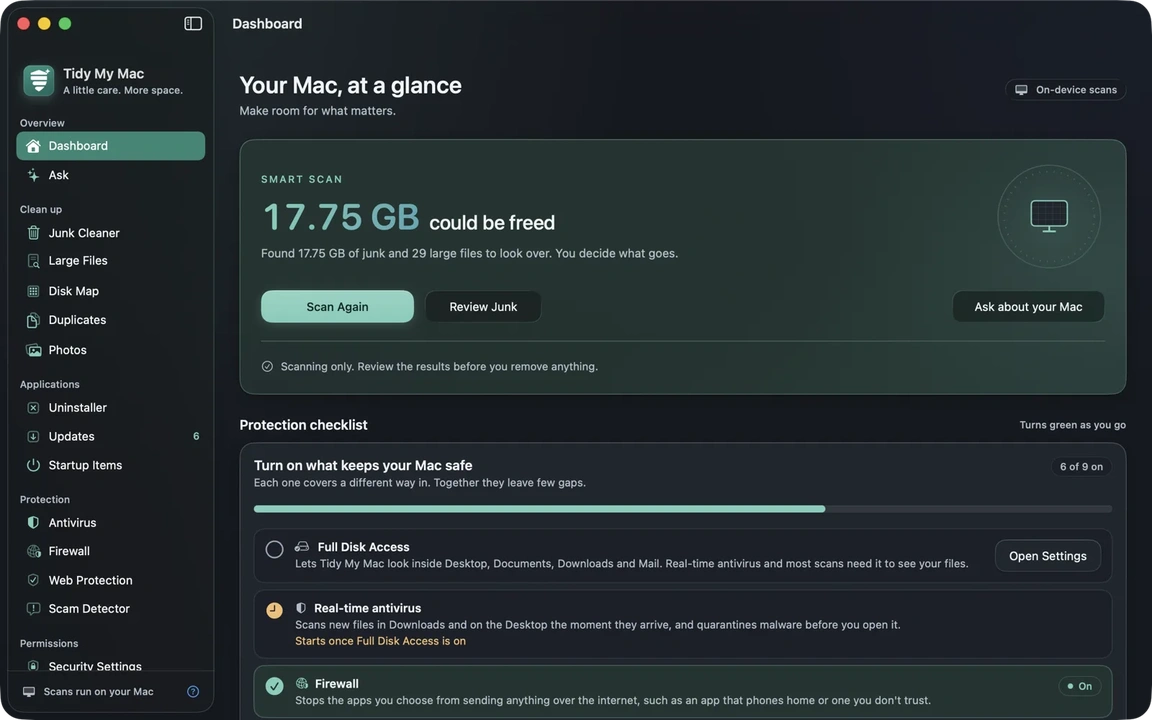
The Mac cleaner category has a credibility problem, and it is worth being specific about it. Two models dominate, and both are bad in different ways.
One is the free tier of a subscription. The app that costs nothing identifies some junk, and every action that would actually matter is behind a paywall that materialises at the worst possible moment. The other is the bloated suite: fifteen tools you will never open, scanning your drive in the background, with a privacy policy that reserves the right to upload file lists to a server so a remote service can decide what is safe to remove.
Tidy My Mac is built to avoid both - as long as you are clear about what it is. It is not a free app. It is one paid app with one price, one subscription, and scans that never leave your Mac.
Seven Days Free, Then One Subscription
Every download starts with a 7-day trial of every section, and the only thing it asks for is an email address. No credit card, no Mac App Store account, and nothing charged when the trial ends - the app simply stops working until you subscribe, and your files, settings and quarantine stay exactly where they are.
After that it is a single subscription for one Mac: $19.99 for the first year, then $59.99 a year from the second year, sales tax and VAT included. There are no tiers and no in-app purchases. One price covers the whole app - cleanup, antivirus, firewall, Web Protection, app updates, virus signatures and blocklists - and you can cancel at any time.
That is worth saying plainly, because it puts the app in an honest place in a category full of asterisks. Compared with the rest of the Mac cleaner market it is at the cheap end, and unlike the cheap end it does not hide the useful half behind the checkout.
Everything Runs on Your Mac
This is the part that matters most. Junk detection, the disk map, duplicate matching, photo analysis, antivirus scanning and web protection lookups - all of it happens locally. Your files are read, never uploaded. There is no account, no sign-in, no telemetry, no analytics and no crash reporting.
The app goes online for a narrow, disclosed list of reasons: to update itself from its own signed feed, to download antivirus signatures, to refresh the list of apps with known security holes, to download Web Protection's blocklists while it is running, to check your other apps for updates when you ask, and to check a scam message only when Apple Intelligence is unavailable or you explicitly request an Enhanced Check. That is the full list.
Six Focused Groups of Tools
Rather than a kitchen sink, the app is organised into six sections that each do one job:
- Overview - a Smart Scan, a dashboard of what it found, your macOS security score, and a cleanup history that lets you put back anything that was removed. Ask answers "why is my Mac slow?" from what the other sections actually measured, using Apple Intelligence when it is on and falling back to built-in advice when it is not.
- Clean up - a Disk Map treemap of where space goes, a Junk Cleaner for caches, logs, Mail attachments, old downloads, installers you already have, iOS backups, local Time Machine snapshots, Xcode simulators, Homebrew, Docker and stale node_modules, Large Files sorted and labelled by type, byte-for-byte duplicate detection that never lets every copy go and correctly counts APFS clones as the zero bytes they really take, and Photos cleanup for burst shots, old screenshots and blurry images.
- Applications - an Uninstaller that removes an app together with everything it left behind (preferences, caches, containers, launch agents, helpers, receipts) and finds leftovers of apps deleted long ago, Updates with apps that have a known security hole surfaced first, and Startup Items showing your measured boot time.
- Protection - antivirus on the open-source ClamAV engine with resumable Quick, Normal and Deep scans, quarantine with restore and real-time checks on Downloads and Desktop; a Firewall view showing which apps connect out and to where, one click to cut an app off the network; Web Protection that blocks phishing and malware sites, scams and fake shops, ads and trackers in every app and browser, with your own always-allow and always-block lists; and a Scam Detector that flags the warning signs in a message before you tap the link.
- Privacy and permissions - a Security Score out of 100 covering SIP, Gatekeeper, FileVault, the firewall, XProtect, automatic updates and vulnerable apps, each item linking straight to the relevant System Settings page; a review of the privacy permissions your apps actually hold, browser extension risk ratings and broken code signatures; and privacy cleanup for browser history, cookies, caches and form data, per profile. Saved passwords are never touched.
- System - live CPU and memory with per-app usage and a Quit button, battery wear, SSD health and temperature, a searchable list of background services and helpers still running after the app that started them closed, and maintenance tasks for the DNS cache, Spotlight index, Open With menu and font caches. It can also run scheduled Smart Scans and virus scans quietly, alert you when something installs itself to run at login or switches on your camera or microphone, and take commands from Shortcuts and Siri.
Web Protection Is the Part Nobody Else Does
Most Mac cleaners stop at "we scanned your files". This one also stops bad sites from loading.
Tidy My Mac downloads the lists of blocked sites and checks every lookup against them on your Mac. A blocked site simply does not load; every other lookup goes unchanged to the DNS server your network already uses. The sites you visit are never sent to us or to anyone else, and the lists keep updating even when the app is closed.
Two honest caveats, because they matter in practice: browsers that use their own secure DNS bypass it, and so does Safari with iCloud Private Relay turned on.
Honest About What It Needs
The app asks for one thing up front, and the site is straightforward about why. Tidy My Mac is not sandboxed, and it needs to read the whole disk - not just its own folders - to find junk, map the disk, match duplicates and scan for malware. So on first launch it requests a single Full Disk Access grant. Without it, scans simply skip Desktop, Documents and Downloads instead of prompting for each folder separately.
That grant is revocable at any time in System Settings, and no scan results are sent anywhere either way. Stating this plainly is worth more than a cleaner privacy page.
Apple Intelligence is optional throughout: Ask falls back to built-in performance advice, and the Scam Detector uses its own rules plus an optional server check. Nothing else changes.
Download
Tidy My Mac requires macOS 26 Tahoe or later; earlier versions are not supported and there is no fallback mode to run in. It ships as a signed, notarized .dmg downloaded directly from the site, and is not sold in the Mac App Store. Start with the 7-day trial at tidymymac.com, and decide after a week whether $19.99 for the first year is worth it to you.